import java.util.*;
import org.jfree.chart.*;
import statgraphics.*;
import statgraphics.eda.*;
import static statgraphics.util.Argument.*;
import statgraphics.util.*;
/**
*
* <p>Example: class PiePlot.</p>
*/
public class PiePlotExample
{
public
static void main(String[] args)
{
String[] category = {"Apple", "Compaq",
"GateWay 2000", "IBM",
"Packard Bell"};
double[] data = {13, 12, 5, 9, 11};
PlotFrame[]
pf = new PlotFrame[6];
pf[0] =
new PlotFrame("Pie Plot I",
new PiePlot("3D",
"Computer
category, data).getPlot(), 500, 270);
pf[1] =
new PlotFrame("Pie Plot II",
new PiePlot("3D",
category, data).plot,
500, 270);
pf[2] =
new PlotFrame("Pie Plot III",
new PiePlot(category,
data).getPlot(), 500, 270);
Hashtable argument = new Hashtable();
pf[3] =
new PlotFrame("Pie Plot IV",
new PiePlot(argument,
category, data).
graphicalAnalysis.getPlot(), 500, 270);
argument.put(OPTION,
"3D");
GraphicalAnalysis graphicalAnalysis
=
new PiePlot(argument,
category, data).graphicalAnalysis;
JFreeChart myPlot =
(JFreeChart)
graphicalAnalysis.output.get("PLOT");
pf[4] =
new PlotFrame("Pie Plot V", myPlot, 500, 270);
argument.put(TITLE,
"Computer
pf[5] =
new PlotFrame("Pie Plot VI",
new PiePlot(argument,
category, data).
graphicalAnalysis.plot, 500, 270);
new PlotFrameFactory().putPlotFrame(pf);
}
}
Results:
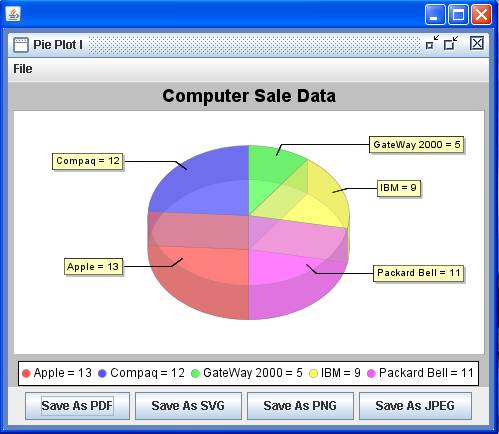

See also: