import
statgraphics.eda.BoxPlot;
import
statgraphics.util.*;
/**
*
* <p>Example: class
BoxPlot.</p>
*/
data
= new double[12][20];
for
(int i = 0; i < 12; i++)
{
for (int j = 0; j < 20;
j++)
{
data[i][j] = -10 + Math.random() * 20.0;
}
}
pf =
new PlotFrame[4];
String[]
dataNames = {"A", "B", "C", "D",
"E", "F", "G", "H", "I",
"J",
"K", "L"};
pf[0]
= new PlotFrame("Box Plot I",
new
BoxPlot(dataNames, "My Box Plot",
"Category", "Data Value", data).getPlot(),
500, 270);
pf[1]
= new PlotFrame("Box Plot II", new BoxPlot(dataNames, data).plot,
500, 270);
time
= new Date[12];
for
(int i = 0; i < 12; i++)
{
time[i] = new Date(105, i -
1, 21);
}
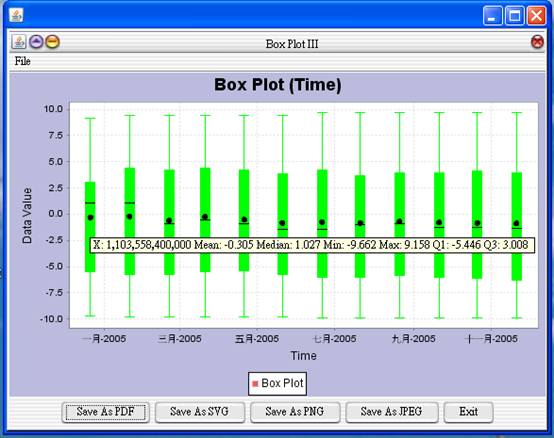
pf[2]
= new PlotFrame("Box Plot III",
new BoxPlot("Box Plot (Time)", "Time",
"Data Value", time, data).getPlot(),
500, 270);
pf[3]
= new PlotFrame("Box Plot IV", new BoxPlot(time, data).getPlot(),
500, 270);
new
PlotFrameFactory().putPlotFrame(pf);
Results:

See also: