2.2. Summarizing Quantitative Data
1. Determine the classes:
For quantitative data, we need to define
the classes first. There are 3 steps to define the classes
for a frequency distribution:
Step
1: Determine the number of nonoverlapping classes, usually 5 to 20 classes.
Step
2: Determine the width of each class,

Step 3: Determine the class limits: the smallest
possible data value should be larger than or
equal to the
lower class limit while the largest possible data value should be smaller
than or
equal to the upper class limit.
Example 2:
Suppose
we have the following data (in days):
|
12 |
14 |
19 |
18 |
15 |
15 |
18 |
17 |
20 |
27 |
|
22 |
23 |
22 |
21 |
33 |
28 |
14 |
18 |
16 |
13 |
We
applied the above procedure to this data.
Step
1:
We
choose 5 to be the number of classes.
Step
2:
 .
.
Therefore, we use 4.2 as the class width.
Step 3:
The 5 classes we choose are
|
12-16.2 |
16.2-20.4 |
20.4-24.6 |
24.6-28.8 |
28.8-33 |
2. Summarizing the data:
Tabular
summary:
In
addition to frequency, relative frequency and percent frequency, another
tabular summary of
quantitative
data is the cumulative frequency
distribution.
Cumulative
frequency distribution: the number of data items with values less than or equal to
the upper class limit of
each class.
Graphical
display:
In
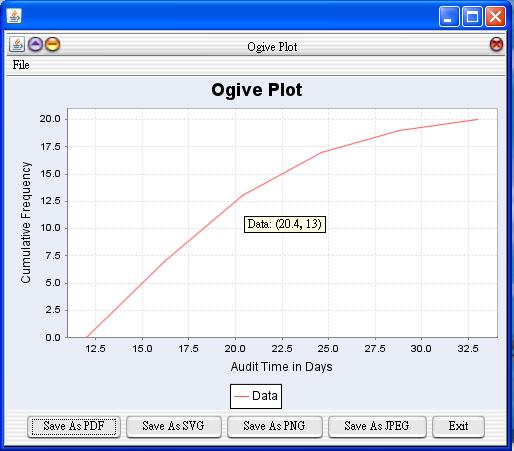
addition to histogram, another graphical display of quantitative data is ogive.
Ogive:
the number of data items with values less
than or equal to the upper class limit of
each class.
Example 2 (continue):
|
Classes |
Frequency |
Relative Frequency |
Percent Frequency |
|
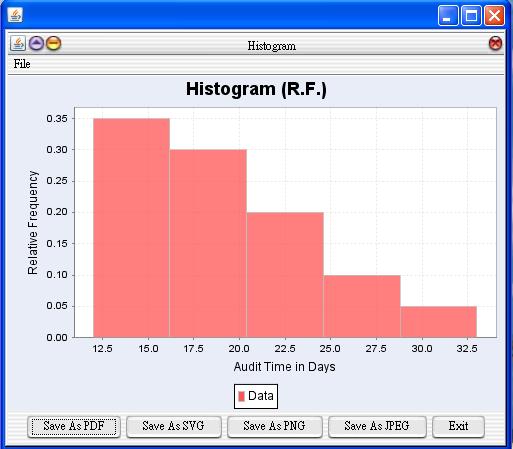
12.2-16.2 |
7 |
0.35 |
35 |
|
16.2-20.4 |
6 |
0.3 |
30 |
|
20.4-24.6 |
4 |
0.2 |
20 |
|
24.6-28.8 |
2 |
0.1 |
10 |
|
28.8-33 |
1 |
0.05 |
5 |
Total
20
1
100
|
Classes |
Cumulative
Frequency |
Cumulative
Relative Frequency |
Cumulative
Percent Frequency |
|
|
7 |
0.35 |
35 |
|
|
7+6=13 |
0.35+0.3=0.65 |
35+30=65 |
|
|
7+6+4=17 |
0.35+0.3+0.2=0.85 |
35+30+20=85 |
|
|
7+6+4+2=19 |
0.35+0.3+0.2+0.1=0.95 |
35+30+20+10=95 |
|
|
7+6+4+2+1=20 |
0.35+0.3+0.2+0.1+0.05=1 |
35+30+20+10+5=100 |


The
histogram is
The
ogive plot is
JavaStatSoft:
Data summary:
Statistics -> Exploratory Data Analysis
-> Quantitative Data
Graphical Display:
Graph -> Exploratory Data Analysis ->
Quantitative Data -> Histogram
Graph -> Exploratory Data Analysis ->
Quantitative Data -> Ogive Plot